Skip to content




Kom godt i gang
Kom i gang med din Xplora-enhed
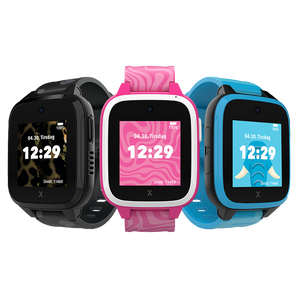
Vi hjælper dig godt i gang med dit Xplora. Uanset om du har et af vores smartwatches eller startphones til børn, guider vores trin-for-trin-videoer dig gennem aktivering af dit mobilabonnement, opsætning af din enhed og tilslutning til Xplora-appen.
Start med trin 1 for at aktivere dit mobilabonnement. Fortsæt derefter til trin 2 for at sætte din Xplora-enhed op.
Har du købt din enhed i Xploras webshop?
Find din ordrebekræftelse, som du har modtaget via e-mail, og følg trinnene for at aktivere dit abonnement.
Har du købt din enhed hos en forhandler?
Gå til start.xplora.com for at vælge og aktivere dit Xplora-abonnement.
Skal du sætte en brugt enhed op?
For enheder med Nano-SIM: bestil et nyt SIM-kort og aktiver dit Xplora-abonnement. For enheder med eSIM: kontakt vores kundeservice.
Trin 1: Aktivér dit Xplora-abonnement
Før du kan komme i gang med din enhed, skal du have et aktivt mobilabonnement. Vælg guiden til din SIM-type nedenfor.
Aktivér dit Xplora-abonnement med eSIM
Har du en Xplora-enhed med eSIM? Følg denne guide for at aktivere dit abonnement, så du er klar til at komme i gang med din enhed.
Activate your Xplora subscription with Nano-SIM
Har du en Xplora-enhed med et fysisk Nano-SIM-kort? Følg denne guide for at aktivere dit abonnement, så du er klar til at komme i gang med din enhed.
Er du i tvivl om, hvilken SIM-type du har?
Afhængigt af modellen bruger Xplora-enheder enten et fysisk Nano-SIM-kort eller et digitalt eSIM. Se efter en SIM-kortholder på siden af din enhed. Hvis der ikke er en synlig SIM-kortholder, har du højst sandsynligt en model med eSIM. Hvis du har et X6Play, skal du først fjerne urets cover for at se efter SIM-kortholderen.
Trin 2: Opsæt din Xplora-enhed
Når dit mobilabonnement er aktiveret, er du klar til at sætte din Xplora-enhed op og forbinde den med Xplora-appen. Vælg din enhed nedenfor for at fortsætte.
Kom i gang med XploraOne
Kom i gang med X6Play
Bemærk: X6Play findes både som Nano-SIM- og eSIM-model. Den enkelte model understøtter kun én SIM-type, så sørg for at bruge den SIM-type, som dit X6Play understøtter.
Kom i gang med XGO3
Bemærk: XGO3 understøtter kun Nano-SIM og kan ikke bruges med eSIM.
Kundeservice
Har du brug for mere hjælp?
Besøg vores hjælpecenter, hvor du finder svar på ofte stillede spørgsmål, hjælp til fejlfinding og flere guides til din Xplora-enhed.

 Danmark
 Norge
Norge
 Sverige
 Suomi
Suomi