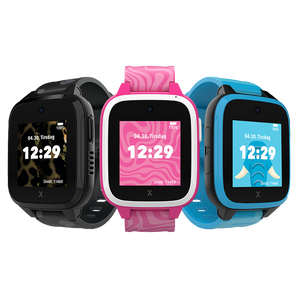
Skip to content



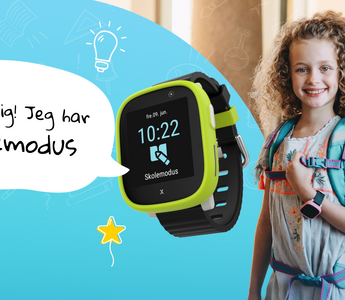
Many parents want to use the Xplora smartwatch when their child starts school.
Here, children are often more out in the world on their own, and there is a lesser degree of involvement from parents in many situations.
Knowing that you can communicate with your child is often a source of peace of mind for mom, dad and the child themselves. But several people ask if schools allow children to bring an Xplora smartwatch to school, so we investigated this further among our followers on Instagram. The majority answered that a smartwatch is allowed at the child's school - as long as it is in school mode!
School mode – designed to take into account the child and their environment
The fact that Xplora smartwatches are specially developed for children as a safe and secure technology is cited by many parents as the main reason why they would like to give their children an Xplora. There is no access to the internet or social media and for everyday life and school, the most important thing is that the watch can be set to ' School mode ' during certain periods, where the watch will only function as a normal wristwatch! Here, the child cannot call, send messages, take pictures or do other fun and games, but ONLY use their smartwatch to keep track of the time, which is also good and important learning for the child. This means that the watch will not be a disturbance in the classroom, recess or in the after-school care, but the child can focus on learning and playing!
See Xplora smartwatches for kids

How does a smartwatch with school mode work?
School mode is one of the many smart features of the Xplora watch, where the child's parents or guardians can set certain periods that prevent the child from using their Xplora watch during the specified times. Here, the watch functions exclusively as a regular wristwatch, with no other functions available to the child - however, the SOS button is still available in case of an accident. School mode is controlled by the parents via the Xplora app, which is why it is not possible for the child to control it themselves. In this way, the Xplora watch is not a nuisance to teachers, other students or the child when the Xplora is on their arm at school. Learn more about school mode here!
Can your child bring the Xplora smartwatch to school?
Children and young people need peace and quiet to learn and perform, which is why several have banned mobile phones in schools. In Denmark, it is often the individual school or teacher who decides what works best for their students. Xplora is also a mobile phone, so when it comes to school, it is important that we respect the school's rules on the use of mobile phones. The rules and guidelines vary from school to school, so we encourage all parents to familiarize themselves with these.
Many people are allowed to bring their Xplora smartwatch to school - as long as it is in school mode!
More and more schools/SFOs are now becoming more familiar with Xplora children's watches and the school mode feature. As a result, many schools allow children to wear their Xplora as long as school mode is turned on.
What if the school says no - even though the watch is in school mode?
Although more and more people are starting to become familiar with Xplora for children, there are still more who do not know our smartwatches well enough. It is therefore important to inform the school and teachers about Xplora and its functions, so that the school knows that this smartwatch stands out from a regular mobile phone; There is no internet access - and not least, the watch has school mode! After dialogue with several parents, our experience is that many of the schools/SFOs who say no to Xplora do not know about school mode - or how school mode works.
We sometimes experience questions like "Is it just like putting your mobile on silent?", "Can parents listen in on the lesson when the child has their Xplora on?", "Can the children themselves set the school mode to ON/OFF?" - and the answer to all of these questions is NO . All the watch's functions are deactivated, and the child can therefore neither play with the watch's camera, send messages, make calls, etc. They can only keep an eye on the time.
Here it becomes an important task for us parents to inform about this, so that the school can make a decision based on a good and correct basis. We have also received feedback from parents who are dismayed that the school says no despite the watch being in school mode, but that the school is not really aware of what school mode is. Here we parents can thoroughly explain to the school that when Xplora smartwatches are in school mode, the child can only use it as a regular wristwatch. All other functions are deactivated and therefore cannot be used by the child.
However, if the school still decides that they do not want to change the rules regarding the use of Xplora smartwatches despite the school mode, then it is of course still possible to use the watch to and from school if the child needs to walk home from school, go to leisure activities or be with friends after school. It is precisely in these situations that Xplora is smart and good to have - namely in situations outside the home where it is important to be able to communicate with the child! The child can simply put their watch with school mode activated in their school bag during the school day and put it back on when school is over. Of course, this requires that the child remembers to put it back on, but many parents we have been in contact with find that this has not been a problem; the children think Xplora is cool - and want to put it on!

Is it too early for children to get a mobile phone?
Many parents believe that five or six years old is too early to give their children a smartphone. Yet they want a means and tool to communicate and connect with their children when they start spending more time away from home. Previously, there was no good alternative, but then Xplora came along!
Xplora is specially developed for children - and is intended to give them a safe and good introduction to the digital world. Xplora watches can make calls, send voice messages and emojis, but have no access to the internet, social media, or other addictive apps. This way we can protect children from digital bullying and inappropriate content online until the children are old enough to understand that world.
Our smartwatch sits safely and securely on the child's arm, preventing the watch from being lost, left behind or perhaps stolen, which is a great advantage when it comes to children aged 4-12. A smartphone is often a more expensive alternative - so it's definitely not fun if the child loses it on the playground or forgets it on a bench in the schoolyard.
Xplora watches have a pedometer to both measure and motivate activity. For parents, it is also great to be able to follow Xplora's GPS in the parent app, where you manage the entire watch, and to be able to pre-approve the contacts who should be able to call the child. In addition, parents can set defined "Safe Zones" and put the watch in school mode at desired, scheduled times. There is just enough technology for a younger child, and is also very simple for parents. In the parent app from your own mobile phone you can easily control your child's entire smartwatch!
Have you signed up for Xplora's activity platform?
Alone on the way to school
In the long term, more parents want their children to be able to walk to and from school on their own. We have received several positive comments that the Xplora watch is perfect for making children feel safer by being more independent, for example on their way home from school alone, and that communication becomes so easy that children can easily ask for permission to be with a friend at home, or that they are going to various leisure activities. By setting safe zones on the watch through the parent app, you will be notified when the child has left home, for example, and when they arrive at a new Safe Zone that you have specified - for example, school.
We hope that in the future all schools will allow smartwatches - as long as school mode is turned on .
See our smartwatches for kids here


 Danmark
 Norge
Norge
 Sverige
 Suomi
Suomi